
 |
 |
 |
 |
...
or your favorite, other, email |
|||
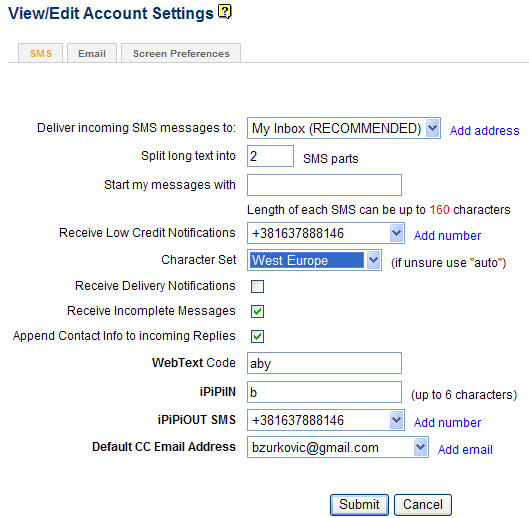
WebText is a Patent Pending new option available only from ipipi.com. Now you can send international text messages directly from any webmail account or even from an email enabled cell phone like Blackberry, Japanese mMode phones... Here's how: Setup (one time) Go to your SMS Settings page to define your WebText Code. Your WebText Code should be 6 to 12 characters long and is case insensitive. Because Confirm Code acts like a password, it's highly recommended to change it frequently.
Sending Text Messages Now go to your email account and compose your message. Address your message. If you want to send SMS to '+18887776666', simply put '+18887776666@opensms.ipipi.com' in the To field. Enter your WebText Code in Subject field and send! Using WebText When Forwarding Incoming SMS to Email There is another benefit to defining WebText code in your account. If you forward incoming SMS messages to an email account, our service will format such email messages so that you can simply hit the reply button in your email reader, write your message and send. Your email message will be received by our service which will convert it to SMS and send it to the original sender. Cool, eh?! |
|||
|
|||

 |
 |
 |
 |
 |
 |
 |
|
|
|||||||
|
|||
Home - Contact Us - Privacy Policy - Terms of Service - Help - Links - Site Map International SMS - SMS - SMS Messaging - Text Message - Send SMS - Email to SMS - WEB to SMS Copyright 2001-2007 Upside Wireless Inc. All rights reserved |